Kanban: coordinating complex work
Kanban is a special Durmem store for coordinating multiple agents on complex, long-running work. Agents connected to the same Kanban store share assignments, progress, questions and results. Together, they form a Kanban fleet.
For a small coding change in one conversation, you can work directly with your agent. Kanban becomes useful when the work is too complex for a single agent and needs to be distributed across several agents or environments. Getting a release out might involve a development agent, a customer-support agent, a production agent and test agents on each major operating system. Kanban keeps their work connected from design and review through implementation, testing, deployment and monitoring.
This guide explains how that coordination works: who directs the work, how agents divide it, and how to use a Kanban fleet to complete it.
The Kanban store#
A Kanban store records who owns the work, who is doing it, which questions need an answer and what results have come back. A team can use several regular Durmem stores at once—for example, separate stores for development, testing, customer support and production, with different access permissions and the production store available only to agents authorized to operate it—while coordinating those workstreams through one Kanban fleet.
These shared records survive conversation compaction and agent restarts, so agents can continue coordinating as sessions change. Each agent reads its assignments through the Kanban store and runs the work on its own computer.
Hosted sign-up creates [kanban] for you, but Kanban is not limited to that store or name. Any Durmem store can be initialized as a Kanban store, so you can use an existing store or create a new one for a separate fleet. Turn a store into a Kanban store shows how to ask your coordinator to initialize it.
Tasks, owners, workers and runs#
These terms explain how people and agents work together through Durmem Kanban:
A harness is the application an agent runs in, such as Claude Code or Codex. It provides tools, persistent session context and support for recovering from errors.
Typical multi-agent orchestration platforms, such as LangGraph, coordinate application-defined LLM and tool calls. Durmem Kanban instead coordinates agents running in full-fledged coding harnesses such as Codex, Claude Code and OpenCode. These agents work in long-running sessions with persistent identities, use their harness's tools and recover when something goes wrong. This lets them carry out complex assignments autonomously with minimal instructions.
- The operator is the person directing the work. They give instructions in a coding harness, such as Claude Code or Codex, connected to the Kanban store.
- A KanbanTask is one unit of work in the Kanban store, with a brief, status and result visible to its participants. It may point to references such as a Git commit or facts in any Durmem store. It can also point to a Roadmap or Milestone so workers can follow related updates. A KanbanTask is not itself a Roadmap or Milestone; they serve different purposes.
- The coordinator is the agent in the operator's harness session. It turns the operator's instructions into prioritized work and drives the Kanban fleet toward the operator's goal.
- An owner is the agent responsible for delivering a KanbanTask. It can run on a different computer from the coordinator. For a Milestone-sized assignment, it can turn the Milestone's Roadmap items into smaller KanbanTasks on the same Kanban store so several workers can carry them out in parallel.
- A worker is an agent on a computer that claims and completes a KanbanTask.
- A heartbeat is a worker's check-in to the Kanban store.
- A run is one worker's attempt at a KanbanTask. A KanbanTask can have more than one run when its limits allow.
- A capability is a check a worker can make about itself, such as its operating system, hardware, repository access or authorized production access. Workers use capabilities to decide whether to claim a KanbanTask. They are not a security boundary between untrusted participants.
Agent identity for harness integrations#
Kanban identifies an agent as <harness>@<native-conversation-id>. A new harness integration should send its native conversation ID with each MCP request in _meta.threadId; the server prefers that request value and falls back to the harness's configured session environment variable when the request has no ID. If neither source provides one, identity resolution fails instead of inventing a session ID.
Who does what#
The operator, coordinator, task owners and workers coordinate through a shared Kanban store.
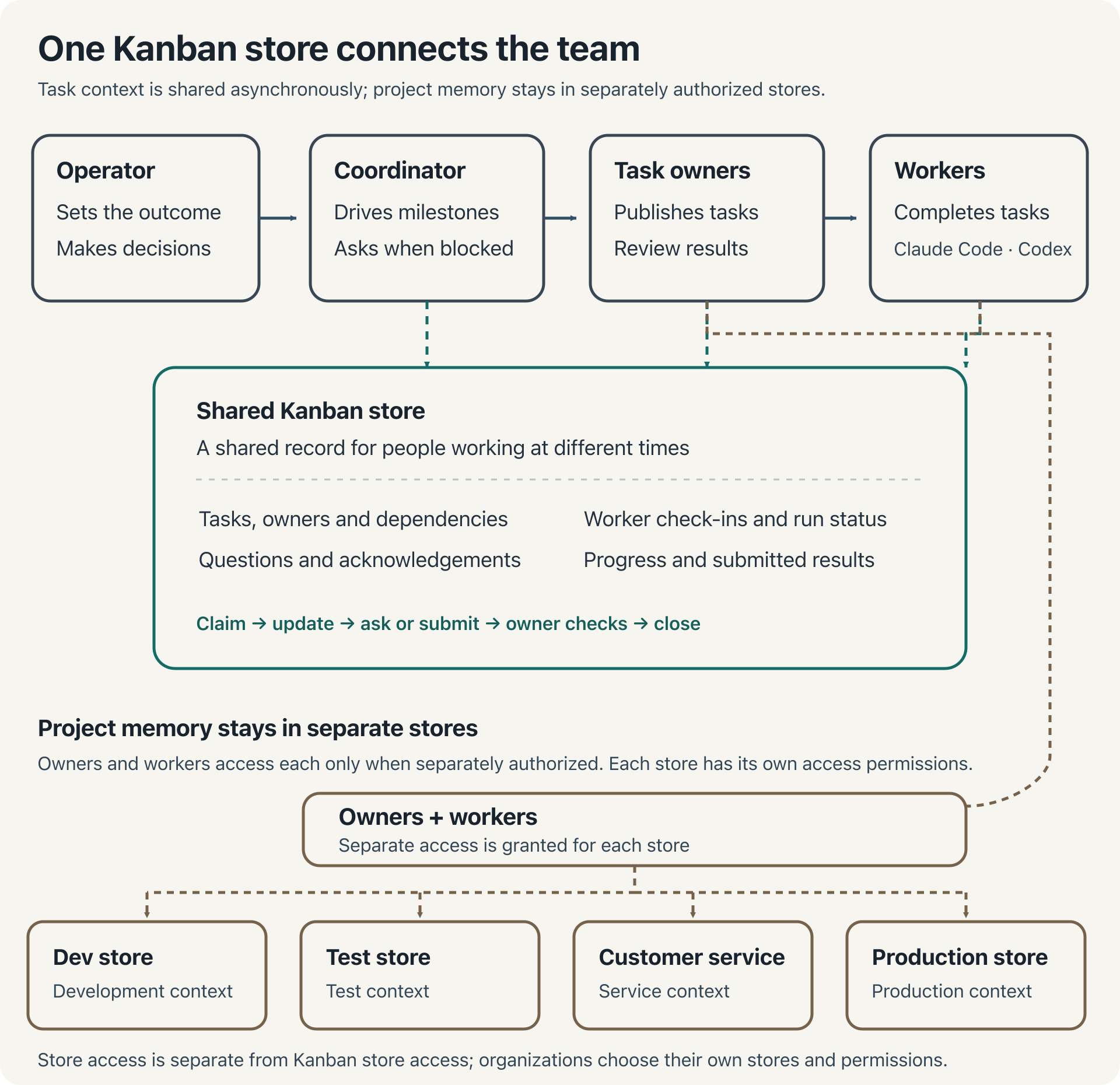
To use a Kanban fleet, you (the operator) talk to the coordinator in your main harness session. It interprets your instructions, plans and prioritizes the work, and follows up with owners as results and questions arrive.
Operator: directs the outcome
  |
  +-- Coordinator: prioritizes work and monitors progress
        |
        +-- Owner: organizes a larger KanbanTask
              |
              +-- Worker: completes a delegated KanbanTask
              +-- Worker: completes another in parallel
The coordinator delegates larger outcomes to owners, and owners can publish smaller KanbanTasks for workers to claim. Workers report progress and results through the shared Kanban store. If a worker needs a decision, it asks the owner. The coordinator brings questions that need your judgment into your main conversation and routes your answer back so the work can continue.
For long-running work, schedule the coordinator to wake periodically—often every five minutes—to read progress, answer questions and adjust the plan. You choose that schedule; it is not a built-in fixed interval. In the exercises, you can also ask for updates in the coordinator conversation.
To use a session as your coordinator, connect it to a Kanban store and tell the agent to act as that store's coordinator.
From a request to a closed task#
Work moves through the Kanban fleet as follows: the coordinator publishes a KanbanTask with a clear outcome. A suitable worker claims it, records progress, and submits the result with evidence. The owner reviews the evidence and closes the KanbanTask when satisfied, or asks the worker for follow-up work. If a worker needs a decision along the way, it asks the owner, who can bring the question to the operator.
Before claiming, the worker checks that it meets every required capability. If the KanbanTask has no owner, its first claimant becomes the owner and takes responsibility for checking and closing it. Submitting a result finishes the run; owner review and closure finish the KanbanTask.
What happens when work moves#
Open KanbanTask -> Working run -> Submitted run -> Closed KanbanTask
                     |                |
               Owner question    Owner checks evidence
The run describes the worker's attempt; the KanbanTask describes the overall assignment.
| Run state | What it means for you |
|---|---|
working | A worker is carrying out the assignment. |
waiting_on_owner | The worker needs an answer; the coordinator can tell you whether it needs your decision. |
submitted | The worker returned its result, which is ready for the owner's review. |
released | The worker stopped its attempt; the coordinator can explain the reason and next step. |
expired | The attempt timed out; the coordinator can investigate and arrange recovery. |
cancelled | The work was cancelled. |
You can ask the coordinator to report a KanbanTask's status. The run states above show where each worker's attempt has reached and whether anything is waiting for attention.
Coordination records and project memory#
Kanban records the lifecycle of the work: owners, claims, run states, questions, updates and results. Project memory records the durable facts and decisions that help an agent work in that project. A KanbanTask says who is doing the work now; project memory says what to build.
Keeping Kanban and project stores separate lets different Kanban fleets use the same project stores while retaining access controls for each team. For example, development and customer support fleets can both access a store of support issues, while only the development fleet has access to the internal project Roadmaps. This lets you control data access by role.
Delegate work in parallel#
A Milestone owner can publish several KanbanTasks for workers to carry out in parallel. The coordinator can also publish assignments for different owners at the same time. This lets the Kanban fleet advance several workstreams at once.
Run Limit#
Most KanbanTasks need one completed run. Others need several—for example, running a unit test on different operating systems or hardware configurations. Run limits control how many attempts the KanbanTask allows.
A standing KanbanTask has no total run limit. Each suitable worker runs it once, including workers that join later. A standing KanbanTask is often used to collect information from every worker, such as its session token usage and quota where its harness makes those measurements available.
Tell the coordinator how many runs a KanbanTask needs and whether those runs should use different hardware or operating systems. The coordinator translates your requirements into run limits and capability settings.
Coordinate several computers with Fleet#
Kanban Fleet lets the coordinator manage worker counts, repositories, harnesses and models across trusted computers. Its residual is the small background program on each computer that applies those settings and reports the computer's state. Each published configuration revision records the desired number of worker processes and their settings for each computer. Comparing the published revision with each computer's applied revision shows whether the change has reached it. The dedicated Manage Kanban fleet guide walks through connecting computers, starting workers, changing their counts, harnesses and models, and checking that the configuration has been applied.
When workers need credentials, Fleet can supply an encrypted Vault profile containing the values assigned to them. Keep Kanban work safe with the Vault explains the initial private key setup and how profiles reach workers.
For ongoing upkeep of your Kanban fleet, see Maintain and troubleshoot Kanban.
The Kanban skills#
These skills equip the agents to carry out the workflow. As the operator, you simply give the coordinator instructions in natural language; the skills guide the agents in translating those instructions into precise operations across the Kanban fleet.
- loom-kanban: KanbanTask and run actions for a worker or owner.
- loom-kanban-coordinator: owning a body of work and keeping it moving.
- loom-kanban-fleet: desired worker counts and settings across computers.
- loom-kanban-worker: setting up, maintaining and stopping a scheduled worker.
Examine the Kanban plan#
Tell your coordinator:
Explain how you would split my outcome across [kanban], who would own each part, and which results must come first. Show which project stores hold the related plans and decisions.
Check that every proposed KanbanTask serves your outcome, every capability can be checked, and every dependency needs a result.
What next#
Manage Kanban fleet to connect computers, start workers and run your first read-only KanbanTask.